

The global proxy server market is projected to grow from $1.746 billion in 2025 to $2.649 billion by 2031, a 7.2% CAGR driven mainly by rising cybersecurity needs and demand for geo-restriction bypass. A lot of that growth is actually coming from businesses scraping data, managing multiple accounts, or verifying ads at a large scale, and honestly, most of them face the same problem at some point: they buy a proxy, plug it in, and just… assume that it’s working.
It usually is. But not always. A proxy that fails quietly can break a scraper mid-run, leak your real IP without any warning, or get an account flagged, and you won’t find out until something has already gone wrong. The fix isn’t complicated, though. You don’t need to have a lot of technical knowledge to check. Here are seven ways to do it, from a browser check that takes ten seconds to a proper terminal test for when you need to be really sure.
1. Use an Online IP Checker
This is the one most people reach for first, and it’s usually enough on its own. Set your proxy in your browser or system settings, open an IP checker site, and it’ll show you the IP address, location, and ISP that the site is currently picking up.
Match that against your proxy server. If it lines up, you’re good; the traffic is routing correctly. If it still shows your actual IP, the proxy isn’t being used, even if everything in your settings looks right.
One thing many people skip: You should check whether the headers are leaking too. Most decent checkers flag this. It matters a lot more than people think if anonymity was the whole point of using a proxy in the first place.
Want proxies that don’t need constant testing in the first place? Check out Express Nodes’ proxy plans.
Premium Proxy Infrastructure
Residential Proxies
🏡
Your content goes here. Edit or remove this text inline or in the module Content settings. You can also style every aspect of this content in the module Design settings and even apply custom CSS to this text in the module Advanced settings.
ISP IPs
🏡
Your content goes here. Edit or remove this text inline or in the module Content settings. You can also style every aspect of this content in the module Design settings and even apply custom CSS to this text in the module Advanced settings.
Fresh IPs
🏡
Your content goes here. Edit or remove this text inline or in the module Content settings. You can also style every aspect of this content in the module Design settings and even apply custom CSS to this text in the module Advanced settings.
Dedicated IPs
🏡
Your content goes here. Edit or remove this text inline or in the module Content settings. You can also style every aspect of this content in the module Design settings and even apply custom CSS to this text in the module Advanced settings.
.
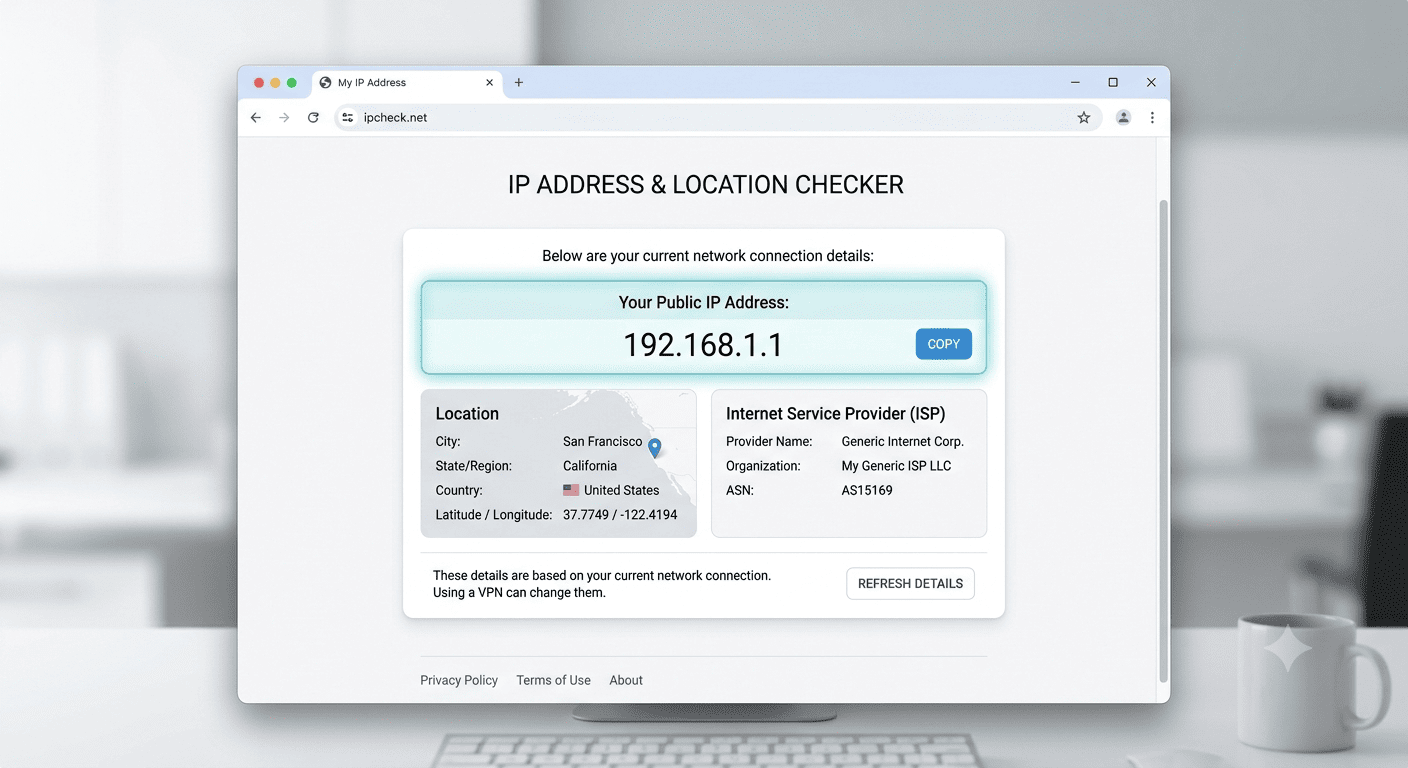
2. Compare Your IP Before and After Connecting
Do you want to be extra sure the checker got it right? Do it manually. Write down your IP with the proxy off. Turn it on. Check again.
Different city, different country- that’s what you’re hoping for, depending on where the server’s based. If the two numbers match, the proxy hasn’t kicked in. Might just be a settings issue rather than the proxy itself being broken, so it’s worth checking that out first.
3. Test It With a cURL Command
If terminals don’t scare you, cURL is probably the cleanest way to test a proxy. One command, routed through the proxy, and it hands back the exit IP right there on screen. No browser involved at all.
This is why a lot of developers use it. Nothing in the background to muddy the result, no cache, no extension quietly interfering. Works for HTTP proxies and SOCKS5 too, just a small change to the scheme in the command. It’s also the easiest one to script, so if you’re checking a whole list of proxies rather than just one, this is where you’d start.
4. Run a Ping Test
Ping won’t tell you if the proxy is actually hiding your IP. What it will tell you is whether the connection itself is stable, and how much latency you’re looking at. Normal response, healthy path. Timeouts or a response that jumps around usually mean a network problem, not a setup mistake.
Good first move too when a proxy that’s been working suddenly stops. Tells you fast whether it’s a connectivity thing or something else further down the line.
5. Use Telnet to Check the Proxy Port
Sometimes it’s not the server; it’s the port. Closed or blocked somewhere along the way, and the whole connection fails as a result. Telnet checks this directly by trying to open a connection to the proxy’s IP and port.
Opens fine? Port’s reachable; the proxy’s at least accepting connections. Refused? Wrong port, proxy’s offline, or a firewall’s in the way somewhere. Either way, it rules out port-level problems fast, before you go looking anywhere more complicated.
6. Send an HTTP Request and Check the Status Code
A step past ping or a port check. Send an actual HTTP request through the proxy, look at the status code that comes back, and now you know whether the proxy isn’t just reachable, but actually passing traffic through to a real site.
200 means it worked, start to finish. Anything in the 400s or 500s means something’s off somewhere; it could be the proxy, could be the target site blocking the request, could be an authentication issue on the proxy’s end.
7. Try Accessing a Geo-Restricted or Blocked Site
This one’s the real test. If reaching geo-blocked content is why you’re using a proxy in the first place, just try it. Load the site with the proxy active. Opens without the usual restriction message? It’s doing its job.
Works especially well for residential and rotating proxies, since it’s checking everything at once: connectivity, whether the IP is actually masked, and whether the target site treats it as legitimate instead of flagging it on sight.
Comparing the 7 Methods
| Method | Technical Skill Needed | Speed | What It Confirms |
| Online IP checker | None | Instant | IP masking, location, header leaks |
| Before/after IP comparison | None | Under a minute | Whether the proxy is actually active |
| cURL command | Basic | Instant | Clean, browser-free proxy test |
| Ping test | Basic | Instant | Connection stability and latency |
| Telnet port check | Moderate | Instant | Whether the proxy port is reachable |
| HTTP status code check | Moderate | Instant | End-to-end proxy functionality |
| Geo-restricted site test | None | Under a minute | Real-world proxy performance |

6. Send an HTTP Request and Check the Status Code
A step past ping or a port check. Send an actual HTTP request through the proxy, look at the status code that comes back, and now you know whether the proxy isn’t just reachable, but actually passing traffic through to a real site.
200 means it worked, start to finish. Anything in the 400s or 500s means something’s off somewhere; it could be the proxy, could be the target site blocking the request, could be an authentication issue on the proxy’s end.
7. Try Accessing a Geo-Restricted or Blocked Site
This one’s the real test. If reaching geo-blocked content is why you’re using a proxy in the first place, just try it. Load the site with the proxy active. Opens without the usual restriction message? It’s doing its job.
Works especially well for residential and rotating proxies, since it’s checking everything at once: connectivity, whether the IP is actually masked, and whether the target site treats it as legitimate instead of flagging it on sight.
Comparing the 7 Methods
| Method | Technical Skill Needed | Speed | What It Confirms |
| Online IP checker | None | Instant | IP masking, location, header leaks |
| Before/after IP comparison | None | Under a minute | Whether the proxy is actually active |
| cURL command | Basic | Instant | Clean, browser-free proxy test |
| Ping test | Basic | Instant | Connection stability and latency |
| Telnet port check | Moderate | Instant | Whether the proxy port is reachable |
| HTTP status code check | Moderate | Instant | End-to-end proxy functionality |
| Geo-restricted site test | None | Under a minute | Real-world proxy performance |
Your Title Goes Here
Your content goes here. Edit or remove this text inline or in the module Content settings. You can also style every aspect of this content in the module Design settings and even apply custom CSS to this text in the module Advanced settings.
Can a proxy work but still leak my real IP?
Yes, and it catches people off guard more than you’d expect. Traffic passes through fine, but the headers still reveal your original IP. Anonymity-focused checkers will catch this, which is part of why a basic IP comparison alone isn’t always enough to go on.
Do free proxy checker tools give accurate results?
For basic stuff, IP address, location, most reputable free ones are fine. Anything deeper, anonymity level, performance under load, you’ll get a more reliable read from dedicated tools or manual methods like cURL.
Why does my proxy work sometimes but not other times?
Usually comes down to one of three things: the connection’s unstable, the proxy’s been rate-limited or blocked by the target site, or you’re on a shared IP that too many people are hitting at once.
So Which One Should You Actually Use?
Let me quickly answer it for you. IP checker or the before-and-after comparison, done in under a minute. But if you’re troubleshooting something that keeps failing, or managing proxies at scale for scraping, automation, whatever it is, cURL, ping, telnet, and the status code check will give you a much better idea of exactly where things are breaking.
Running proxies across dozens or hundreds of sessions? Build one or two of these into the workflow instead of checking manually every time; it’ll save you more time than it costs. A proxy that fails silently mid-task, whether that’s a scraping job or account management, ends up costing way more than the few seconds a check takes upfront.
Good proxy infrastructure makes this less of an issue to begin with, but checking before anything important still isn’t a bad habit to have.
Sticky Sessions Explained: When You Need the Same IP for Longer
Imagine that you are logged into an Instagram account through a proxy. You post a caption; everything looks fine. Then you refresh the page thirty seconds later, and suddenly you're logged out, or sometimes it's even worse: the account gets flagged for suspicious...
Best Proxies for Sneaker Copping and Limited-Release Drops
A hyped release goes live. You refresh, you click, and the size you wanted is gone before the page even finishes loading. That's not bad luck. Nike alone says its SNKRS app fields an average of 12 billion bot calls a month, with bots making up anywhere from 10% to 50%...

Proxies for Price Monitoring and Competitor Tracking (E-commerce)
Amazon changes prices on its platform roughly 2.5 million times a day, according to price intelligence firm Profitero, compared to around 50,000 monthly price changes each for competitors like Best Buy and Walmart. That number alone explains why manual price checks...